Showing posts with label DSDN142. Show all posts

Friday, 19 October 2012

Final Code + Pictures

This is the code for my final Interactive Mouse Toy; I call it eyeball monsters.

//////////////////////////////// Below is the code


int x = 250; //X location
int y = 150; //Y location
int pupilx = 5;
int pupily = 6;
int s = 10;
int sun = 255; //sun opacity visible when released
int col = 255; //background colour
int bro = 0; //opacity visible when clicked
int grey =255;// grey parts of monster opacity
int grr = 1; //red in small eye


void setup(){
size(500,500);
frameRate(24);
smooth();
noCursor();
}

void draw(){
strokeWeight(1);
 noStroke();
//this is the code for the background and click monster

//beach and face
 fill (255,220,150,sun);
 rect (0,0,500,500);
 fill (60,30,10,bro);
 rect (0,0,500,500);

//big eye ring
 fill (102,170,255,sun);
 ellipse (x-400,y,750,500);
 ellipse (x+400,y,750,500);
 fill (20,bro);
 stroke(0,bro);
 strokeWeight (16);
 ellipse (x-400,y,750,500);
 ellipse (x+400,y,750,500);

//big eye outline
  strokeWeight(1);
  float o2 = map(mouseY, y-75, y+75, y-10, y+10);
  strokeWeight(4);
  stroke (0,bro);
  fill (255,0+(mouseX-pmouseX),0+(mouseX-pmouseX),bro);
  ellipse(x-270,o2,450,300);
  ellipse(x+270,o2,450,300);
  fill(255,220,70,sun);
  noStroke();
  ellipse(x-270,y,450,300);
  ellipse(x+270,y,450,300);
  //potential sun stars lines/triangles

//big pupil
  float i1 = map(mouseX, x-340, x-160, x-265, x-235);
  float i1b = map(mouseX, x+340, x+160, x+265, x+235);
  float i2 = map(mouseY, y-75, y+75, y-10, y+10);
   
//angryeyelines
stroke (255,0,0,bro);
strokeWeight(1);
 line (i1,i2,x-270,o2);
 line (i1-45,i2,x-495,o2);
 line (i1+45,i2,x-80,o2);
 line (i1,i2-45,x-270,o2-80);
 line (i1,i2+45,x-270,o2+80);
 line (i1-33,i2-33,x-373,o2-67);
 line (i1+33,i2+33,x-167,o2+65);
 line (i1-33,i2+33,x-373,o2+65);
 line (i1+33,i2-33,x-167,o2-65);

 line (i1b,i2,x+270,o2);
 line (i1b+45,i2,x+495,o2);
 line (i1b-45,i2,x+80,o2);
 line (i1b,i2+45,x+270,o2+80);
 line (i1b,i2-45,x+270,o2-80);
 line (i1b+33,i2+33,x+373,o2+67);
 line (i1b-33,i2-33,x+167,o2-65);
 line (i1b+33,i2-33,x+373,o2-65);
 line (i1b-33,i2+33,x+167,o2+65);


  noStroke();
  fill (20,bro);
  ellipse (i1,i2,100,100);
  ellipse (i1b,i2,100,100);
 
//face nose
 strokeWeight(16);
 stroke(0,bro);
 fill(60,30,20,bro);
 ellipse (x,500,600,200);
 fill (102,170,255,sun);
 ellipse (x,500,600,200);
 fill(0,bro);
 ellipse (100,500,250,100);
 ellipse (400,500,250,100);
 fill(255,220,70,sun);
 ellipse (100,500,250,100);
 ellipse (400,500,250,100);


//this is the start of the code for my monster   
//This is the shell of the eye 
 noStroke();
 strokeWeight(1);
 fill (150,grey);

 //legs
 triangle (x,y,250+mouseY,y+300,x+30,y);
 triangle (x,y,250-mouseY,y+300,x-30,y);
 triangle (251+mouseY,y+300,251+(mouseY*93/100),y+280,290+mouseY,y+320);
 triangle (249-mouseY,y+300,249-(mouseY*93/100),y+280,210-mouseY,y+320);

 //arms
 triangle (x-110,y,x-130,y,width-mouseX,height-mouseY);
 triangle (x+110,y,x+130,y,width-mouseX,height-mouseY);
 ellipse  (width-mouseX,height-mouseY,30,30);
 ellipse  (width-mouseX,height-mouseY,30,30);

 //grey eye shape
 ellipse (x,y,180,150);
 ellipse (x-90,y,80,40);
 ellipse (x+90,y,80,40);
 triangle (x,y,x-130,y,x-55,y-60);
 triangle (x,y,x-130,y,x-55,y+60);
 triangle (x,y,x+130,y,x+55,y+60);
 triangle (x,y,x+130,y,x+55,y-60);

//important floats
  float  x1 = map(mouseX, x-25, x+25, x-1, x+1);
  float x2 = map(mouseY, y-25, y+25, y-2, y+2);
//eyelashes 
 float zamberg = x1-25; // responsible for eyelashes
 while (zamberg<x1+25)
 {
 stroke(0);
 line (x1,x2,zamberg,x2+55);
 line (x1,x2,zamberg,x2-55);
 zamberg = zamberg+10;
 }
 
//This is the white (that turns red) eyeball part
  stroke(0);
  fill(255,255-(mouseX-pmouseX)*grr,255-(mouseX-pmouseX)*grr);
  ellipse(x1, x2, 100, 100);   


//This is the black pupil
 fill(0,0,0);
 float y1 = map(mouseX, x-25, x+25, x-pupilx, x+pupilx);
 float y2 = map(mouseY, y-25, y+25, y-pupily, y+pupily/2);

 stroke (255);
 line (x1,x2,y1,y2);
 line (x1-45,x2,y1-9,y2);
 line (x1+45,x2,y1+9,y2);
 line (x1,x2-45,y1,y2-9);
 line (x1,x2+45,y1,y2+9);
 line (x1-33,x2-33,y1,y2);
 line (x1+33,x2+33,y1,y2);
 line (x1-33,x2+33,y1,y2);
 line (x1+33,x2-33,y1,y2);

 noStroke();
 ellipse (y1,y2,30,30);
//this is the end of the code for my monster
}

void mousePressed(){
if (mousePressed == true){

  grey =100;
  bro = 255;
  grr = 0;
 
  col = 255;
  sun = 0;

}
}
void mouseReleased(){
  cursor (ARROW);
 
  grey =255;
  bro = 0;
  grr = 1;
 
  col = 255;
  sun = 255;
 
}

////////////////////////////////////////end of code.

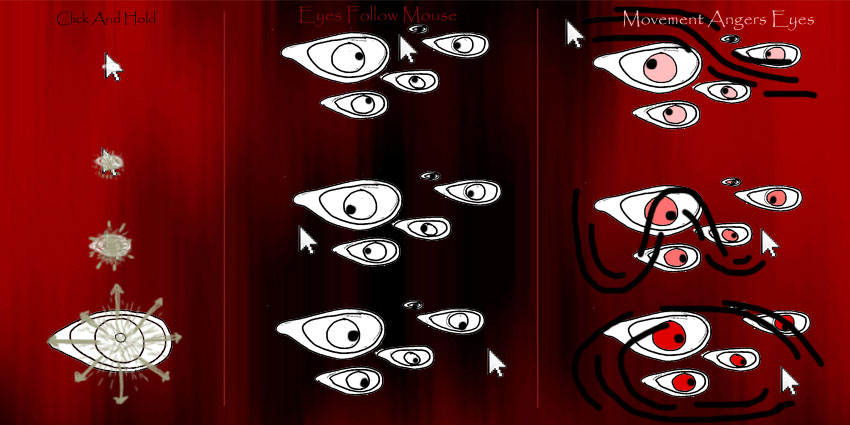
Below are images of my working eyeball monsters mouse toy.


The small monster is interactive, his eye follows you and gets angry, and his limbs all move.
When the mouse is pressed and held the big monsters eyes move and get angry, they follow the small monsters gaze.

Thursday, 18 October 2012

Existing Eyeball Monsters - Inspiration

This example was inspiration to me, firstly because it has eyes that follow the mouse, a very important part of what my mouse toy is going to be. It also has a monster element to it which is interesting as it is not just a thing following the mouse, it has a character.

I want to create a monster with interactive eyes and other potentially interactive functions. He/She will have a cute appeal that makes you want to cuddle it like the claw aliens from toy story.


//The following is not my work, it is an example that I have taken inspiration //from.


/**
 * Monster Dance
 *
 * Assignment:
 * Course: Interactive Digital Mdedia
 * Author: David Langly
 * Date:
 *
 * Description: Group of monsters dancing to the beat
 * of the music.
 */
Monster m1;
Monster m2;
Monster m3;
Monster m4;
void setup() {
  size(500,500);
  strokeWeight(3);
   
  m1 = new Monster(150, 50);
  m2 = new Monster(40, 300);
  m3 = new Monster(300, 250);
  m4 = new Monster(350, 100);
}
void draw() {
  background(244,38,59);
   
  // Update each monster's pupils to follow cursor.
  m1.update(mouseX, mouseY);
  m2.update(mouseX, mouseY);
  m3.update(mouseX, mouseY);
  m4.update(mouseX, mouseY);
   
  // Display each monster with updated pupil position.
  m1.display();
  m2.display();
  m3.display();
  m4.display();
}
void mousePressed() {
  m1.mousePressed();
  m2.mousePressed();
  m3.mousePressed();
  m4.mousePressed();
}
void mouseDragged() {
  m1.mouseDragged();
  m2.mouseDragged();
  m3.mouseDragged();
  m4.mouseDragged();
}
void mouseReleased() {
  m1.mouseReleased();
  m2.mouseReleased();
  m3.mouseReleased();
  m4.mouseReleased();
}
/**
 * Monster.
 *
 * This class defines the blueprint for creating a monster
 * with a triangular head and two bulging eyes. The monster
 * is cool because its bulging eyes follow the mouse cursor
 * and grow with time. Moreover, the position of the monster
 * can be changed by clicking near the monster's eye and
 * dragging with the mouse. The functionality to move the
 * monster was implemented based on the Mouse Functions
 * example application bundled with Processing.
 */
class Monster
{
  float monsterX;
  float monsterY;
  Eye leye;
  Eye reye;
   
  boolean bover = false;
  boolean locked = false;
  float bdifx = 0.0;
  float bdify = 0.0;
   
  Monster(int x, int y) {
    monsterX = x;
    monsterY = y;
    leye = new Eye(50, 50);
    reye = new Eye(150, 50);
  }
   
  void update(int mx, int my) {
    leye.update(mx-monsterX, my-monsterY);
    reye.update(mx-monsterX, my-monsterY);
     
     
    if (isInside(mx, my))
    {
      bover = true;
    }
    else
    {
      bover = false;
    }
  }
   
  boolean isInside(int mx, int my) {
    if (leye.isInside(mx-monsterX, my-monsterY))
    {
      return true;
    }
    if (reye.isInside(mx-monsterX, my-monsterY))
    {
      return true;
    }
    return false;
  }
   
  void mousePressed() {
    if (bover)
    {
      locked = true;
    }
    else
    {
      locked = false;
    
     
    bdifx = mouseX-monsterX;
    bdify = mouseY-monsterY;
  }
   
  void mouseDragged() {
    if (locked)
    {
      monsterX = mouseX-bdifx;
      monsterY = mouseY-bdify;
    }
  }
   
  void mouseReleased() {
    locked = false;
  }
   
  void display() {
    pushMatrix();
    translate(monsterX, monsterY);
     
    // draw all parts of the monster that is
    // static, i.e. everything apart from the
    // eye. make sure all coordinates are
    // relative to the current location of
    // the monster.
    stroke(0);
    fill(230, 201, 42);
    triangle(0, 0, 200, 0, 100, 150);
      
    leye.display();
    reye.display();
     
    popMatrix();
  }
}
/**
 * Eye.
 *
 * This class defines the blueprint for diplaying an eye whose
 * pupil follows the position of the mouse cursor. The original
 * idea and calculations were taken from the example application
 * "Arctangent" bundled with the Processing application.
 *
 * The eye increases and decreases in size automatically as a
 * function of time. The initial size of an eye as well as the
 * rate at which the eye grows are both determined by using a
 * random number generator.
 */
class Eye
{
  final static int MAX_EYE_SIZE = 100;
  final static int MIN_EYE_SIZE = 20;
  final static float MAX_EYE_VELOCITY = 0.2;
  final static float MIN_EYE_VELOCITY = -0.2;
   
  int ex, ey;
  float size;
  float velocity;
  float angle = 0.0;
   
  Eye(int x, int y) {
    ex = x;
    ey = y;   
    size = random(MIN_EYE_SIZE, MAX_EYE_SIZE);
    velocity = random(MIN_EYE_VELOCITY, MAX_EYE_VELOCITY);
  }
  
  boolean isInside(float mx, float my) {
   float distance = sqrt(sq(ex - mx) + sq(ey - my));
   if (distance <= size)
   {
     return true;
   }
   else
   {
     return false;
   }
  }
  
  void update(float mx, float my) {
    angle = atan2(my-ey, mx-ex);
    size += velocity;
    if (size > MAX_EYE_SIZE) {
      velocity = -velocity;
    }
    if (size < MIN_EYE_SIZE) {
      velocity = -velocity; 
    }
  }
   
  void display() {
    pushMatrix();
    translate(ex, ey);
    fill(255);
    stroke(0);
    ellipse(0, 0, size, size);
    rotate(angle);
    fill(153);
    ellipse(size/4, 0, size/2, size/2);
    popMatrix();
  }
} /////////////////////End of example

Wednesday, 17 October 2012

Sauron's Eye

 An idea I had was to have the theme of Lord Of The Rings where the eye was Sauron's eye at the top of the tower and the ring appeared whenever you clicked.

The eye and the background goes red when agitated by the mouse.

I have since decided against this.

I Suck

Sucky Drawing
Two days before hand in and I realize that I suck at drawing.

I want to be able to edit the colour and therefore need large empty spaces, but without all of the messy line work I realize my drawing looks like a couple of squiggles.

I will try to produce something on processing that isn't just an ellipse.

Tuesday, 16 October 2012

Cut Up and Agitated

Today I experimented with changing colours and images. I found that Images themselves cannot (as far as I know) change colour in processing, so I have cut up a picture of an eyeball and used the space behind it to have a shape created in processing underneath it that changes colour when the mouse is moved quickly, the eye turns red as if agitated.


////////*

int size = 150;

void setup(){
size(500,500);
frameRate(15);
smooth();


}

void draw(){
 
fill(255,255-(mouseX-pmouseX),255-(mouseX-pmouseX));
ellipse (250,250,150,150);
  PImage green;
green = loadImage("Eyeball 2.png");
green.resize (size,size);
image(green, 250-size/2, 250-size/2);
 
}

*//////////

 I think that as far as eyeball picture goes, this is a sloppy method, it looks as if a two year old has attacked a picture of an eye with scissors, I will need to either do the pictures a lot better or create the image on processing as I had originally planned.
The good thing about this is that the colour changing as a result of the mouse moving works very effectively. I will incorporate this into my final design.

Stressing over arrays

I have read the array's section over and over, I have tried copying lots of examples, I still can not figure them out.

I tried and tried a lot to figure them out, and I couldn't.

I need to forget about arrays and create something that doesn't rely on them; this means no more multiple enlarging eyeballs.

Back to the drawing board or so to speak.

I'm stressed

Iamge from: http://thebookshelfmuse.blogspot.co.nz/2010/12/want-high-stakes-amp-up-stress.html

Friday, 12 October 2012

Beat Tutorial

I have played with a couple of techniques that I have learnt from a tutorial on beats.

I am able to make images appear on the sound of a beat from a song using a simple snippet of code and by having the song appear in the same folder as the program.

///The following is the code I have used for beat practice.


import ddf.minim.*;
import ddf.minim.analysis.*;

Minim minim;
AudioPlayer song;
BeatDetect beat;

void setup(){
    size(400, 400);
    noStroke();
    background(255, 0, 0);
    minim = new Minim(this);
    song = minim.loadFile("Somebody That I Used To Know.mp3");
    song.play();
    beat = new BeatDetect();
}

void draw(){
    fill(0, 10);
    rect(0, 0, width, height);                beat.detect(song.mix);
    if (beat.isOnset()){
     
PImage both;
both = loadImage ("Eyeball 4c.png");
both.resize (160,50);
image(both,random(50,450),random(50,450));

    }
}

void stop(){
    song.close();
    minim.stop();
    super.stop();
}


////////


This is entertaining as I can play differnt songs that have different beats and they will all make the images pop up at different times.

Some interesting songs that I have practiced with are:
psycho killer by the talking heads,
throw down by tenacious d,
somebody that I used to know by Gotye ft Kimbra.

Array Problems and Help

I have talked to both of my tutors about my project and how I wish to have many objects appearing on the screen in different locations and different sizes.
To do this I am going to need to know how to create an array. This is going to be difficult as I do not know how to. Up until today I had no idea what an array is. I can grasp the concept of an array, I know that it stores many pieces of data in different 'boxes' that can be retrieved whenever you ask for them, I just have no idea of how to code it.

I have been told that if I try hard enough I will figure it out.

I have been to the library today to find a book that will hopefully help me in my quest in solving my array problems. The book is called 'Algorithms or Visual Design' by Kostas Terzidis. It looks as if it will help me, in the contents it says there is a section for learning arrays, it also assumes no prior knowledge which is always a good thing when beginning something.

I will have a read over the weekend.

Wednesday, 10 October 2012

Eyeball Blog Inspiration

I have been told that I should  draw my eyeball(s) rather than create it in coding as it will look much more realistic and less constructed.

Here are some images for inspiraion, courtesy of my friend google images.


Abstract image of teary eyes

Ignore the imp - The eyeball is very detailed


Pencil drawn
Real cows eyeball


Very cartoonish


Simply animated eye.

Tuesday, 9 October 2012

Processed Eyes

Here are some images of my current program in action. It shows differrent combinations of eyeballs as they pop up.

Currently each mouse button when pressed will pop up with a different image,
left mouse button shows a red right eye
right mouse button shows a green left eye
middle mouse button shows both eyes


 At this stage I had got an eye image to appear whenever a mouse button was pressed.


 Here I have played with the mouse toy creating an image out of a colection of smaller eye images.


 Here I have continued playing with green eyeballs to create images.


I have continued working with mouse functions to allow different eyes to appear when clicking left and right.


I have also got the middle mouse button to make a picture of both eyes when clicked.


Lastly, I have experimented with increasing the size of the eyes as I hold down a mouse button for longer, so far this only creates images where each successive image is slightly larger than the previous but I hope to solve this problem.


Monday, 8 October 2012

Current Images

These are the images of eyes which I am currently bringing into my mouse toy.


These are working for now but I would like to create my own eye images, these may potentially be drawn by hand.

Sunday, 7 October 2012

Eyeballs in pop culture

In pop culture the eye is prominant many characters and creatures, in some cases it is the eyes that define them. Some examples that a lot of you will be familiar with are below.

 Tim, or any of the minions from despicable me. Their eyes are big and eneable them to do what minions should, observe things, create evil and party. I chose Tim beacuse he only has the one eye, some would say he is a modern day cyclops, but a cute one.

Another cute character from the movie Toy Story is the alien from the claw machine. Along with his blue suit and green skin the fact that he has three eyes makes him one of the most memorable animated minor characters from the 90's.
The Martian Ambassidor from the movie Mars Attacks has avery prominant eyes that seem to pop out of their sockets, the purpose of his eyes are to scare us, they are creepy and disgusting and not from being overly complicated, but by having a hollow socket surrounding them.
Perhaps the most famous eyeball in history is that of the cyclops, the one eyed monster. In this illustration of the cyclops its one eye takes up the majority of its upper face.

 The album cover of Tool's Aenema features an eyeball that seems to have two pupil's, this is definately a new take on something that seems so obvious.


The film Un Chien Andalou best portrays our associations wiht eyeballs and sensitivity and pain.
In the scene seen in the picture above a razor blade slices a woman's eye. This was done using the props of a cows eyeball.


With my project I wish to incorporate the eyeball motif as something that dominates my mouse toy; this means creating an eye that stands out from all else on the page.


Images from :

http://www.drawinghowtodraw.com/stepbystepdrawinglessons/2011/11/how-to-draw-tim-the-minion-from-despicable-me-with-easy-step-by-step-drawing-tutorial/

http://www.bradcook.net/games/articles/2010/07/toystory3/index2.html

http://plasticandplush.com/2010/08/review-mars-attacks-martian-ambassador.html#.UIBe3PWFJyJ

http://blenderartists.org/forum/showthread.php?142541-Staring-Contest-Cyclops-Portrait

http://ragazzagiovanna.deviantart.com/

http://wherethelongtailends.com/un-chien-andalou-an-andalusian-dog-1929/

Tuesday, 2 October 2012

Early Stages


My code is at the early stages. It enables the user to create an eyeball whenever and wherever on the screen they click any mouse button.
I would like similar yet different eyes to be created when pressing different mouse buttons, I would also like these eyes to grow larger as you hold down the mouse button for longer periods of time.


//////////////////Here is my code so far....


void setup () {
size  (500,500);
}

void draw(){}

void mousePressed(){

PImage b;
b = loadImage("Eyeball 4.png");
b.resize (80,50);
image(b, mouseX, mouseY);

}

Friday, 28 September 2012

For Interim


Something Working


My mouse toy aims to enable the user to create an experience that is interactive but also which the user has some control over. The control comes from the placement of eyeballs onto a canvas, the interaction comes from the reaction of the eyeballs as a result of the movement of the mouse.
Mouse movement will relate to where the eyeballs are looking. Frantic movement will irritate the eyeballs causing them to change colour into a deep red.

Eyeballs are creepy. There is something pleasantly unpleasant about them. Eyeballs have many symbolic meanings, from sight, to clairvoyant visions of the past and future. In Egyptian myth the eye was not the passive organ of sight but more an agent of action, protection or wrath.

Currently I am also studying film at the Kelburn Campus and we have recently covered horror movies, In horror films the eyeball is used in many ways, as an indication of terror and pain in victim characters, and of control by the main antagonist. The eyeball is also a vulnerable part of the body and is easily irritated and/or pained. The sight of a hurt eyeball can cause us to experience imagined pain in our own eyes.

The point of all this is that hopefully my final mouse toy will be a little bit disgusting but will also keep someone entertained for a while.


////////Here is the working code I have so far.

void setup() {
  size(500, 500);

}

void draw() { }

void mousePressed() {

if (mousePressed == true){
//Eyeball gets bigger/values for eyeball size increases/value for eyeball
//size copies the value for the timer which is increasing
} else {
 //eyeball stops growing/
}
 
int X=mouseX;
int Y=mouseY;
int s=20;
float r=random(1);

//scale();                      //some sort of differing number
  fill(203,169,159);
  ellipse(X,Y,8*s*r,5.5*s*r);
  fill(190,164,103);
  ellipse(X,Y,7*s*r,5.4*s*r);
  fill(42,14,10);
  ellipse(X,Y,5*s*r,5*s*r);
  fill(0);
  ellipse(X,Y,s*r,s*r);
 
 }

////////

Wednesday, 26 September 2012

Googly Eyes

The following is a code that I found and have addapted slightly, I plan to incorporate something similar into my final code so that many eyeballs can have moving pupils.

float x, y;
float easing = .5;
PVector circle = new PVector(250, 250);
int radius = 200;

void setup() {
  size(500, 500);
  x = y = width/2;
  noStroke();
  smooth();
}

void draw () {
  background(51);
  fill(255);
  ellipse(circle.x, circle.y, radius+50, radius+50);

  PVector m = new PVector(mouseX, mouseY);
  if (dist(m.x, m.y, circle.x, circle.y) > radius/2) {
    m.sub(circle);
    m.normalize();
    m.mult(radius/2);
    m.add(circle);
  }

  fill(0, 0, 255);
  ellipse(m.x, m.y, 0, 0);

  x = x + (m.x - x) * easing;
  y = y + (m.y - y) * easing;

  fill(0, 0, 0); 
  ellipse(x, y, 60, 60);
}


Some static images of the program: