Showing posts with label Coding. Show all posts

Thursday, 4 October 2012

Flash Code for Buttons

The flash tutorial that Craig showed us gave us a code that enables symbols to turn into buttons:


stop();
btnDirect.addEventListener(MouseEvent.CLICK, buttonClickHandler);
function buttonClickHandler(event:MouseEvent):void
{
 trace("Button clicked!");
  MovieClip(root).gotoAndStop(MovieClip(root).currentFrame+1);
}

,

 I am definitely going to need to know how to do this as I require my interface to navigate through different screens, or I might need to show certain animations such as  zooming in on an area if map, this I can only do if I know how to create and use buttons.
So far I have not been able to create a successful button but I have been asking around like crazy for help. My fingers are crossed that somebody will know what to do, until then I will work on setting up my interface screens.


Tuesday, 2 October 2012

Early Stages


My code is at the early stages. It enables the user to create an eyeball whenever and wherever on the screen they click any mouse button.
I would like similar yet different eyes to be created when pressing different mouse buttons, I would also like these eyes to grow larger as you hold down the mouse button for longer periods of time.


//////////////////Here is my code so far....


void setup () {
size  (500,500);
}

void draw(){}

void mousePressed(){

PImage b;
b = loadImage("Eyeball 4.png");
b.resize (80,50);
image(b, mouseX, mouseY);

}

Friday, 28 September 2012

For Interim


Something Working


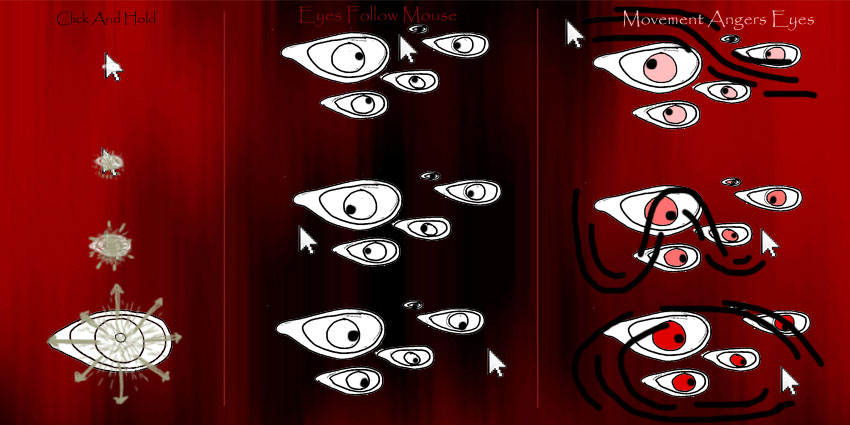
My mouse toy aims to enable the user to create an experience that is interactive but also which the user has some control over. The control comes from the placement of eyeballs onto a canvas, the interaction comes from the reaction of the eyeballs as a result of the movement of the mouse.
Mouse movement will relate to where the eyeballs are looking. Frantic movement will irritate the eyeballs causing them to change colour into a deep red.

Eyeballs are creepy. There is something pleasantly unpleasant about them. Eyeballs have many symbolic meanings, from sight, to clairvoyant visions of the past and future. In Egyptian myth the eye was not the passive organ of sight but more an agent of action, protection or wrath.

Currently I am also studying film at the Kelburn Campus and we have recently covered horror movies, In horror films the eyeball is used in many ways, as an indication of terror and pain in victim characters, and of control by the main antagonist. The eyeball is also a vulnerable part of the body and is easily irritated and/or pained. The sight of a hurt eyeball can cause us to experience imagined pain in our own eyes.

The point of all this is that hopefully my final mouse toy will be a little bit disgusting but will also keep someone entertained for a while.


////////Here is the working code I have so far.

void setup() {
  size(500, 500);

}

void draw() { }

void mousePressed() {

if (mousePressed == true){
//Eyeball gets bigger/values for eyeball size increases/value for eyeball
//size copies the value for the timer which is increasing
} else {
 //eyeball stops growing/
}
 
int X=mouseX;
int Y=mouseY;
int s=20;
float r=random(1);

//scale();                      //some sort of differing number
  fill(203,169,159);
  ellipse(X,Y,8*s*r,5.5*s*r);
  fill(190,164,103);
  ellipse(X,Y,7*s*r,5.4*s*r);
  fill(42,14,10);
  ellipse(X,Y,5*s*r,5*s*r);
  fill(0);
  ellipse(X,Y,s*r,s*r);
 
 }

////////

Wednesday, 26 September 2012

Googly Eyes

The following is a code that I found and have addapted slightly, I plan to incorporate something similar into my final code so that many eyeballs can have moving pupils.

float x, y;
float easing = .5;
PVector circle = new PVector(250, 250);
int radius = 200;

void setup() {
  size(500, 500);
  x = y = width/2;
  noStroke();
  smooth();
}

void draw () {
  background(51);
  fill(255);
  ellipse(circle.x, circle.y, radius+50, radius+50);

  PVector m = new PVector(mouseX, mouseY);
  if (dist(m.x, m.y, circle.x, circle.y) > radius/2) {
    m.sub(circle);
    m.normalize();
    m.mult(radius/2);
    m.add(circle);
  }

  fill(0, 0, 255);
  ellipse(m.x, m.y, 0, 0);

  x = x + (m.x - x) * easing;
  y = y + (m.y - y) * easing;

  fill(0, 0, 0); 
  ellipse(x, y, 60, 60);
}


Some static images of the program:


Tuesday, 25 September 2012

Arrays Tutorial

// I am learning how to use an array. This is what we did in class:


int dotcount=10;

float [] xn = new float [dotcount];
float [] yn = new float [dotcount];
float [] s = new float [dotcount];


void setup (){
 size (500,500);
 
  int i=0;
  while (i < dotcount){
 
  xn[i] = random (500);
  yn[i] = random (500);
  s[i] = random (40);
  i=i+1;
  }
}
  void draw(){
    background(255,255,255);
   
    int i=0;
  while (i < dotcount){
 
    ellipse (xn[i],yn[i],60,10);
    xn[i]=xn[i]+s[i];
    if (xn[i]>500){
      xn[i]=0;
    }
   
  i=i+1;
 
  }

}

Also these videos are helpful for learning code:
http://www.youtube.com/playlist?list=PL632BB8C3F7E776BA&feature=plcp&fb_source=message

Current 25/9/2012

 //Here is some of my code, it is developing slowly.
 //I plan for it to do more than just move one eyeball but I am learning as go so it is taking some time.
 //My next step is to figure out how to produce many eyeballs.
 //I then want to change the scale of the eye as the mouse button is pressed; move the eye pupil
// towards the mouse; and change the colour of the eyeballs as the mouse moves faster.

float [] circle_x = {};
float [] circle_y = {};

 int z=0;
 int a=0;

void setup(){

 int count = 0;
  size (500,500);

}

void draw()
{
   background (255);
  int x=20; 
 
 
int i=0;
while (i<circle_x.length){
  i=i+1;
   fill(203,169,159);
  ellipse (z,a,8*x,5.5*x);
 fill(190,164,103);
  ellipse (z,a,7*x,5.4*x);             //My eyeball shape
 fill(42,14,10);
  ellipse (z,a,5*x,5*x);
 fill(0);
  ellipse (z,a,x,x);
 
}
while (i<circle_y.length){
  i=i+1;
   fill(203,169,159);
  ellipse (z,a,8*x,5.5*x);
 fill(190,164,103);
  ellipse (z,a,7*x,5.4*x);             //My eyeball shape
 fill(42,14,10);
  ellipse (z,a,5*x,5*x);
 fill(0);
  ellipse (z,a,x,x);
}
}

void mousePressed(){
 circle_x = append(circle_x,mouseX);
 circle_y = append(circle_x,mouseY);
  z=mouseX;
  a=mouseY;
}

Friday, 24 August 2012

Code Final Project 2

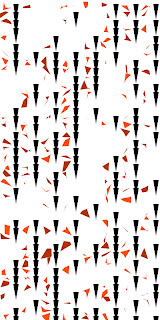
 Below is the code for all four of my images, each is a seperat code.

////////////////////////////////First Image

void setup() {
  size (400,800);
  background (221,221,221);
  smooth ();
  noStroke ();
 
int x=0;
int y=0;
int r=0;
int d=7;


  while (y<800){
  while (x<400){


//tri 
   if (y<400){
    fill (143,45,120);
   }
   else {
     fill(210,121,213);
   }
       triangle (x+30-d,y+40,x+30+d,y+40,x+30,y+2);


//quad   
   if (y<400){
          fill(146,50,8,200);
            }
       else {
           fill (236,172,74,200);       
            }
    quad (random (x-r,x+r),random (y-r,y+r),random(x-r,x+r),random(y+20-r,y+20+r),random(x+20-r,x+20+r),random(y+20-r,y+20+r),random(x+20-r,x+20+r),random(y-r,y+r));
   
   
    x=x+40;
  }
  x=0;
 y=y+40;
  }

}


////////////////////////////////////Second Image


void setup() {
  size (400,800);
  background (221,221,221);
  smooth ();
  noStroke ();
 
int x=0;
int y=0;
int r=10;
int d=7;


  while (y<800){
  while (x<400){


//tri 
   if (y<400){
    fill (143,45,120);
   }
   else {
     fill(210,121,213);
   }
       triangle (x+30-d,y+40,x+30+d,y+40,x+30,y+2);


//quad   
    float ran=random (0,2);
    if (ran<1)
            {
           fill (236,172,74,200);
            }
       else {
                  fill(146,50,8,200);
            }
    quad (random (x-r,x+r),random (y-r,y+r),random(x-r,x+r),random(y+20-r,y+20+r),random(x+20-r,x+20+r),random(y+20-r,y+20+r),random(x+20-r,x+20+r),random(y-r,y+r));
   
   
    x=x+40;
  }
  x=0;
 y=y+40;
  }

}

///////////////////////// Third Image


void setup() {
  size (400,800);
  background (221,221,221);
  smooth ();
  noStroke();
 
int x=0;
int y=0;
int r=50;
int d=5;

  while (y<800){
  while (x<400){


//tri 
 if (y<400){
    fill (143,45,120);
   }
   else {
     fill(210,121,213);
   }
       triangle (x+30-d,y+40,x+30+d,y+40,x+30,y+2);
   
//quad   
    float ran=random (0,2);
    if (ran<1)
            {
           fill (236,172,74,150);
            }
       else {
                  fill(146,50,8,150);
            }
    quad (random (x-r,x+r),random (y-r,y+r),random(x-r,x+r),random(y+20-r,y+20+r),random(x+20-r,x+20+r),random(y+20-r,y+20+r),random(x+20-r,x+20+r),random(y-r,y+r));
   
   
    x=x+40;
  }
  x=0;
 y=y+40;
  }

}


//////////////////////////////Fourth Image


void setup() {
  size (400,800);
  background (221,221,221);
  smooth ();
  noStroke();
 
int x=0;
int y=0;
int r=150;
int d=1;

  while (y<800){
  while (x<400){


//tri
    if (y<400){
    fill (143,45,120);
   }
   else {
     fill(210,121,213);
   }
       triangle (x+30-d,y+40,x+30+d,y+40,x+30,y+2);
  
//quad  
    float ran=random (0,2);
    if (ran<1)
            {
           fill (236,172,74,150);
            }
       else {
                  fill(146,50,8,150);
            }
    quad (random (x-r,x+r),random (y-r,y+r),random(x-r,x+r),random(y+20-r,y+20+r),random(x+20-r,x+20+r),random(y+20-r,y+20+r),random(x+20-r,x+20+r),random(y-r,y+r));
  
  
    x=x+40;
  }
  x=0;
 y=y+40;
  }

}

Thursday, 23 August 2012

Code Development

 Below is what is likely to create my final code. I have done a lot of work at Tuesday's tutorial (21/8/2012) and also at home, having downloaded processing.


void setup() {
  size (400,800);
  background (142,0,28);
  smooth ();

 
int x=0;
int y=0;
int r=10;
int d=4;

  while (y<800){
  while (x<400){


//tri 
    float rand=random (0,2);
    if (rand<1)
            {
    fill (200,190,140);
            }
       else {
    fill(251,247,228);
            }
       triangle (x+30-d,y+40,x+30+d,y+40,x+30,y+2);
   
//quad   
    float ran=random (0,2);
    if (ran<1)
            {
           fill (120,120,120);
            }
       else {
                  fill(66,66,66);
            }
    quad (random (x-r,x+r),random (y-r,y+r),random(x-r,x+r),random(y+20-r,y+20+r),random(x+20-r,x+20+r),random(y+20-r,y+20+r),random(x+20-r,x+20+r),random(y-r,y+r));
   
   
    x=x+40;
  }
  x=0;
 y=y+40;
  }

}

Sunday, 19 August 2012

Graph Idea


An idea I have that is potentially gimicky is to create a graph to contain the rest of my coding images, as if I was measuring the structure/noise as time goes on.

I created the above images fairly easily, whether or not the fit in with the rest of the image I do not know.


Trials

 Here are some of my trials. I have used this mostly as a practice of how to use loops. Initially I thought 'for' loops would be easier than 'while' loops, but I have found out the contrary; while loops allow the code to be set out a lot neater on the page and therefore easier to follow.


 Here I have made columbs of squares and triangles of many different and random colours. The squares then transform into random quadrilaterals; the first step towards noise.


 Here the triangles are growing. Then the quadrilaterals continue to grow towards noise.


 Lastly I tried to rotate some of the triangles so some were facing up and others down, this did not work but I rotate a lot of my image completely off of the page. This was because I using the rotation tool with out using the pushmatrix and popmatrix functions which allow a part of the image to rotate about its own centre of rotation.

Friday, 3 August 2012

25 Final Images


 25 Final Images


Final Code Project 1

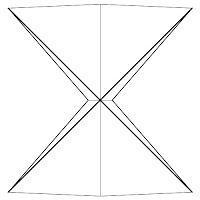
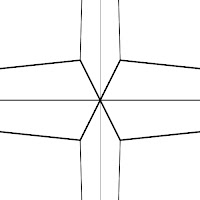
Here is my final code for Project 1:


int x = 250;
int y = 250;

int h = 200;
int h2= 100;
int w = 1000;
int w2= 50;


void setup(){
 
size(500,500);
smooth();

background(255);
stroke(0);

   strokeWeight (1);
line (x,y,x,y-h);
line (x,y,x,y+h);
   strokeWeight (3);
line (x,y,x+w,y);
line (x,y,x-w,y);

   stroke(0);
   strokeWeight (4);
line (x,y,x-w2,y-h2);
line (x,y,x-w2,y+h2);
line (x,y,x+w2,y-h2);
line (x,y,x+w2,y+h2);

   stroke(0);
   strokeWeight (2);
line (x,y-h,x-w2,y-h2);
line (x,y-h,x+w2,y-h2);
line (x,y+h,x-w2,y+h2);
line (x,y+h,x+w2,y+h2);
   strokeWeight (4);
line (x-w,y,x-w2,y-h2);
line (x-w,y,x-w2,y+h2);
line (x+w,y,x+w2,y-h2);
line (x+w,y,x+w2,y+h2);


}

void draw(){}
void keyPressed(){
 save(selectOutput());
}


Variables that I have changed are strokeweight of lines, stroke opacity, and lengths of widths and height.

Saturday, 28 July 2012

32 Images


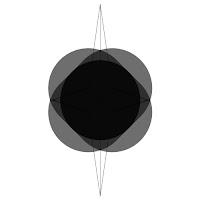
This is the first batch of images I have created using processing. The only variables that I have changed are the two different heights and the two different widths.
I need to investigate otther variables that I can incorporate into my ideas.


2
1


3
4


5

6


8
7
10
9


12
11


14
13


16
15


17


18


19
20


21
22


23
24


25
26


2
28


29
30


31
32